
Battery replacements and electrical repairs are a normal part of vehicle maintenance, but for owners of older Volkswagen models equipped with the factory Delta 6 audio unit, losing power usually triggers an annoying security lockdown. If your double-DIN stereo is stuck displaying “SAFE” or demanding a 4-digit PIN code after a power cut, you are not alone.
Because the Delta 6 relies on internal anti-theft protocols linked to the car’s electrical system, any complete power drop breaks the security handshake. Fortunately, getting your sound system back online is straightforward once you know the steps.
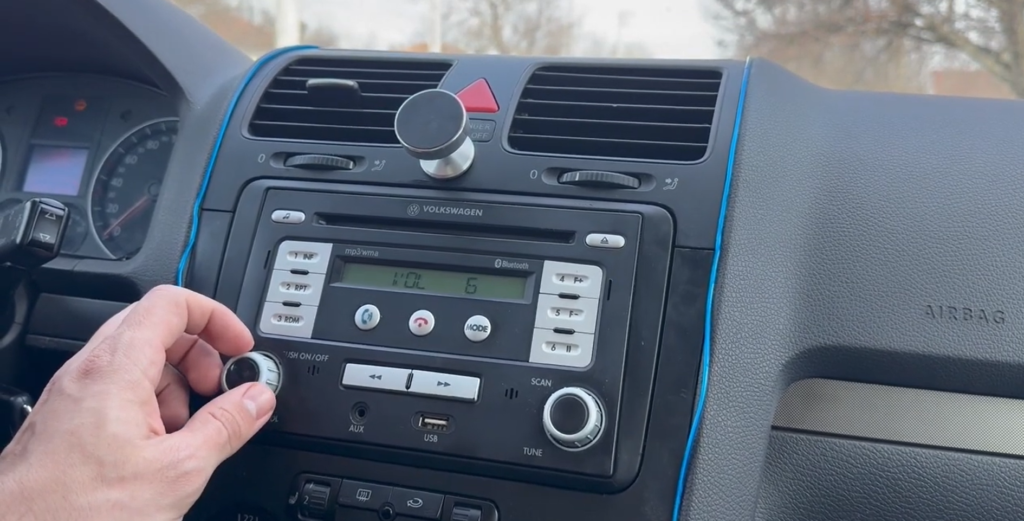
Why Does the Delta 6 Lock Itself?
Volkswagen integrated factory anti-theft measures directly into the Delta 6 double-DIN unit. When power is entirely severed—such as during a battery swap—or when the head unit is moved to another vehicle, the system cuts off audio playback to deter theft.
Important Note on Lockouts: If you guess the wrong PIN twice in succession, the display will lock you out and stop accepting inputs. To clear this timer, leave your ignition key turned to the ON position and keep the radio powered on for up to 60 minutes until the input screen reappears.
How to Retrieve Your Factory PIN Code
Options for recovering your lost radio code generally fall into three categories:
- The Owner’s Documentation: Check the original service folder for a small paper card marked “Radio Card.” In most pre-owned vehicles, unfortunately, this card has long since vanished.
- Local Dealership Support: You can visit an authorized Volkswagen service center, though this usually involves scheduling an appointment, proving vehicle ownership, and paying a hefty administrative fee.
- Instant Database Retrieval (Recommended): The fastest approach is using an online service like RadioCodeGenerator.com, which pulls original factory codes instantly using your stereo’s unique serial number.
Step-by-Step Unlocking Procedure
Step 1: Extract the Radio Serial Number
To generate the correct code, you need the unique 14-character manufacturer serial number stamped or barcoded on the chassis.
- Carefully detach the plastic trim bezel surrounding your Delta 6 unit using a non-marring panel tool.
- Remove the screws securing the double-DIN chassis into the dashboard cavity.
- Slide the unit out slightly to inspect the sticker labels on the metal housing, and note down the 14-character serial number starting with VWZ.
Step 2: Get Your Code
Navigate to the Volkswagen Radio Code section on RadioCodeGenerator and submit your 14-character VWZ serial string to retrieve your exact factory-matched 4-digit PIN.
Step 3: Input the Code and Restore Audio
- Turn the ignition and radio on until the screen displays 1000 or SAFE.
- Use the unit’s front preset buttons to cycle through the digits of your code:
- Tap preset button 1 repeatedly to select the first digit.
- Tap preset button 2 repeatedly for the second digit.
- Tap preset button 3 repeatedly for the third digit.
- Tap preset button 4 repeatedly for the fourth digit.
- Once the correct 4-digit code is visible on the display, press and hold both the PTY and SCAN buttons simultaneously (or press down on the rotary confirmation knob, depending on your specific hardware revision) for a few seconds to lock the code in.
The system will instantly verify the PIN, unlock the internal amplifier, and restore your CD changer and audio presets.