


How To Locate Your Honda Serial Number
Retrieve your Honda radio unlock code online quickly and securely. Follow the step-by-step guides below.
Find Honda Serial Number On Screen
If you own a newer Honda car than 2001, you most likely have the serial number on the radio screen without having to remove it. To get the code, first make sure that your radio is on (on screen it should be something like “CODE”), then press and keep pressed buttons 1 and 6 for a few seconds. Depending on your radio model, you will see a serial number starting with U.

Find Honda Serial Number On The Radio Label
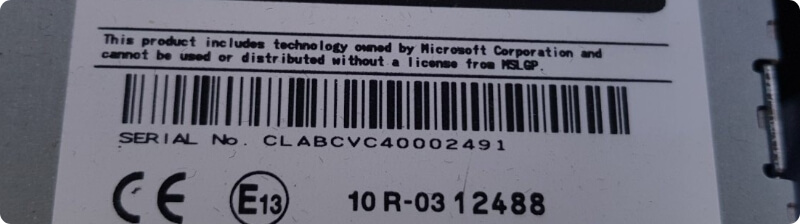
If you own an older radio model, you will have to partially remove the radio from the dashboard in order to find the serial number. The serial number is located on the label on the back of the radio just under or above the barcode. All you need are some release keys or something similar found at home. You just have to pin them on the corners of the radio and pull to you. The process is a simple one and it will take you just a few minutes. Be aware, you don't have to disconnect any wires in the process.
Honda serial numbers Example: CALBBVC30003451 OR 4344224
Serial Number For Honda Accura Navigation Or 2003+ Navigation Models
If you own a 2000+ Honda Nav model, you can find the serial number without having to remove the radio from the dashboard. You can use these easy-to-follow guidelines to get the serial number:
- First make sure that the Navigation is OFF.
- With one hand press and keep pressed buttons SEEK (SEEK / SKIP) and CH (CH/DISC) and with the other hand press the Power button.
- On screen you will have to see a serial number divided into two parts. Serial number Example: U2231 L4453
Retrieve Your Honda Radio Unlock Code Online: A Step-By-Step Guide
- You only need your Honda radio serial number and a valid email address where you want to receive the unlock radio code.
- Then just press the button "Get your code now!", a new page will open where you'll have to provide the required information needed to generate your Honda code.
- Now just enter the Honda radio serial number, followed by the email address where you want to receive your radio code.
- The final step is to finalize the payment procedure.
- After the transaction will be validated the code will be generated and sent to you in just a few moments.
What Is A Honda Radio Code?
A Honda radio unlock code represents a unique numeric code that is required to unlock a Honda car radio that has been locked due to security measures or power loss. When a Honda car radio is disconnected from power or the car battery is replaced, it may require an unlock code to reactivate and allow access to its functions.
How Do I Enter The Unlock Code Into My Honda Radio?
The procedure for entering the unlock code may vary depending on the specific Honda radio model. Generally, you will use the radio's preset buttons or touchscreen to input the code. You can check your vehicle's manual for more information. You have here a video TUTORIAL on how to do it.
How To Retrieve The Honda Unlock Code?
To obtain your Honda radio unlock code, you will need the serial number of your radio unit. The serial number is typically located on a sticker or label on the radio unit itself (on the sides or the back) or in the owner's manual. You can then use this serial number to generate your code online using a service as ours or contact a Dealership to get your code.
Can I Unlock My Honda Radio Without The Code?
No, the unlock code is necessary to unlock a Honda car radio that has been locked. If you do not have the correct unlock code, it is recommended to contact Honda customer support or use an authorized online platform as ours to obtain the code.