
A locked screen requesting a 4-digit PIN code is one of the most common and frustrating issues faced by Opel owners (such as those driving a Corsa D, Antara, or Zafira B). This phenomenon usually occurs after disconnecting the car battery for repairs, replacing the alternator, or following a power surge within the vehicle’s electrical system.
The Opel Touch & Connect multimedia system, developed in partnership with tech giants Bosch and Blaupunkt, is a robust navigation unit, but it is highly sensitive to security breaches. If the PIN prompt has appeared on your unit’s screen, there is no need to panic or pay exorbitant fees at official dealerships.
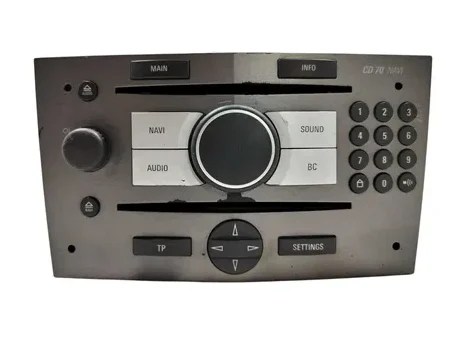
In this comprehensive guide, we will explain step-by-step how to safely retrieve your radio unlock code from the comfort of your home using a fast, tested, and fully automated online solution.
What is Opel Touch & Connect and Why Does It Lock?
Launched as a premium option for Opel models between 2010 and 2015, the Touch & Connect system combines a 5-inch color touchscreen, Bluetooth connectivity, SD card/USB media playback, and a highly efficient GPS navigation module for its generation. Being a valuable piece of equipment, Bosch and Blaupunkt engineers equipped it with a strict anti-theft system.
The Anti-Theft Protection Mechanism
Every Opel Touch & Connect unit is programmed from the factory with a unique security code (PIN). This code is stored in the device’s non-volatile EEPROM memory and is synchronized with the car’s engine control unit. As long as the power supply remains stable, the radio operates smoothly.
The moment the voltage drops below a certain threshold or the battery is completely disconnected:
- The radio’s volatile memory resets.
- Upon the next startup, the unit checks whether it is still connected to its original power source and demands identity confirmation via the PIN code.
- If the correct code is not entered, the device remains completely unusable, displaying nothing but the lock screen.
The Danger of Entering Incorrect Codes
Unlike older car stereos, Bosch / Blaupunkt units utilize an attempt counter with a timed lockout feature. If you start entering random codes based on guesswork, the device will progressively increase the waiting time between attempts (ranging from a few minutes to several hours). If the maximum limit of 10 incorrect attempts is reached, the unit will lock down permanently (System Locked). Unlocking it at that point can no longer be done via software; it requires physical intervention on the motherboard at an automotive electronics lab. For this reason, it is crucial not to test random codes.
How to Recover the Original PIN Code
There are two primary pathways to regain possession of your unique security code:
Option 1: The Official Opel Dealership
You can physically visit an authorized Opel dealer to request a document called the Car Pass (the vehicle’s identity sheet which contains the radio code, key code, etc.).
- Disadvantages: This process involves making appointments, traveling to the dealership, presenting ownership documents for the vehicle, and a considerable financial cost. Furthermore, issuing the document can take anywhere from a few days to a week. If your Touch & Connect unit was purchased second-hand from an online marketplace and retrofitted into your car, the dealership will not be able to help you based on your car’s chassis number (VIN).
Option 2: Online Decoding Based on the Serial Number
Because the PIN code is linked to a unique mathematical algorithm generated at the factory alongside the device’s serial number, it can be calculated with 100% precision. By using the primary global platform radiocodegenerator.com, the entire process becomes a matter of just a few minutes. You do not need any technical background, you do not have to ship the unit anywhere, and you receive the exact code that was configured by Bosch/Blaupunkt in the factory.
Step-by-Step Guide: Extracting the Navigation Unit and Finding the Technical Data
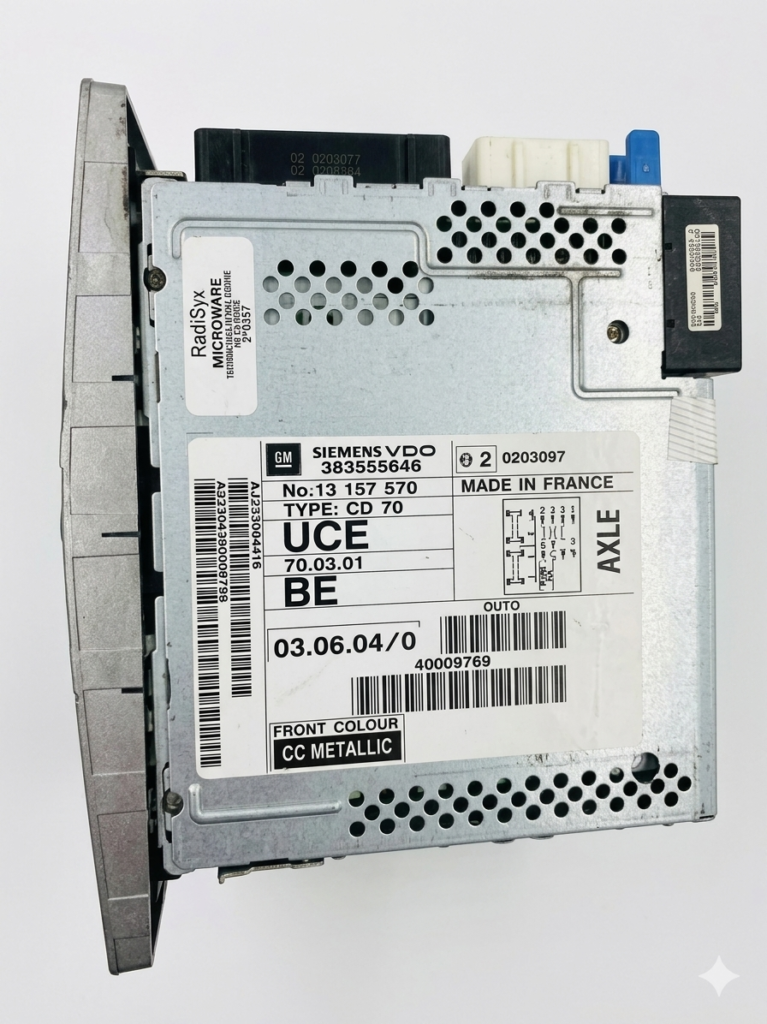
To generate the code online, you need the technical information located on the label of the player. Unfortunately, for the Opel Touch & Connect, the serial number cannot be displayed on the screen via button combinations while the unit is locked. Therefore, physically extracting the unit from the dashboard is required.
Required Tools
- 4 radio removal keys (PC5-132 type or U-shaped): These can be found online for very low prices or at local car accessory shops.
- Alternatively, if you do not have dedicated keys, you can use 4 long, thin nails or 4 pieces of stiff wire cut to the appropriate length and thickness to fit into the front slots.
- A microfiber cloth (to protect the dashboard plastic from accidental scratches).
Removal Procedure (Step-by-Step)
- Turn off the vehicle’s ignition: Ensure the key is out of the ignition switch to avoid any accidental short circuits while handling the internal wiring.
- Identify the release slots: On the front panel of the Opel Touch & Connect navigation system, in all four corners, you will notice four small, round holes.
- Insert the removal keys: Push the 4 keys simultaneously into the holes until you hear a subtle “click.” This sound indicates that the internal metal clips locking the unit into the dashboard cage have been pressed and released.
- Extract the unit: Firmly grasp the removal keys or the edges of the player and slowly pull it outward. The unit should slide out smoothly along its guide rails.
- Do not disconnect the cables (Optional): To read the label, it isn’t strictly necessary to unplug the rear harnesses. You can simply rest the unit on the center console (using the microfiber cloth underneath to avoid scratching the plastic trim).
Correctly Identifying Elements on the Label
Once the navigation unit is pulled out, look at the top or side metal casing. You will find a large white technical sticker filled with barcodes, manufacturer logos (Bosch/GM), and identification numbers.
For the Opel Touch & Connect system, three specific elements are vital:
| Element Name | Specific Bosch / Opel Format | Practical Example | Role in Unlocking |
| Serial Number | Always begins with 7612 and has 10 digits, or contains a long alphanumeric structure. | 7612002066 or CM0066C1234567 | The primary identifier in the decryption database. |
| Part Number | Usually starts with 7 64X XXX XXX or an 8-digit GM code. | 7 612 002 066 or 13412345 | Confirms the exact hardware revision of the device. |
| Production Date | Stamped directly onto the label, in a MM.DD.YY or YY.MM.DD format. | 11.10.12 | Helps calibrate the precise generation algorithm. |
⚠️ Useful Tip: The safest way to avoid transcription errors (such as confusing the number
0with the letterO, or1with the letterI) is to take a clear, high-resolution photo of the label using your smartphone. This allows you to zoom in and double-check every digit.
How to Use the Dedicated Service to Generate Your Code
Once you have carefully written down the serial number, part number, and date from the unit, you are ready to generate your official PIN code. The process is optimized to be incredibly simple and intuitive.
Simply access the page created specifically for these systems: Opel / Radio Code Generator . There you will find a secure order form tailored strictly to navigation models within the Opel lineup.
Steps to Submit Your Request:
- Filling in the Data: Enter the serial number extracted from the label into the corresponding field. Fill in the Part Number and production date if requested by the form.
- Email Address: Enter a valid, personal email address. This is where you will receive your generated PIN code, invoice, and safety guidelines.
- Placing the Order: The system automatically validates whether the format of the entered serial number is correct (preventing the submission of erroneous data). Payment is handled securely using internationally recognized methods (Credit Card or PayPal), providing full buyer protection.
- Code Delivery: The platform’s automated algorithms query the central database for Bosch / Blaupunkt units, calculate the correct PIN, and deliver it directly to your inbox in the shortest time possible.
The Correct Procedure for Entering the PIN into Your Opel Touch & Connect
After receiving your 4-digit code via email, you must input it into the device. While it sounds straightforward, the Bosch touchscreen system requires you to follow a specific sequence for the unit to validate it.
How to Input the Digits on the Touchscreen:
- Turn on the car’s ignition and press the power button of the navigation unit (the left volume knob).
- The screen will display the message: “Enter PIN:” followed by four empty blank lines (
_ _ _ _) and a virtual numeric keypad (0 to 9) right on the display. - Enter the 4 digits of the code you received, one by one, tapping the screen carefully.
- After entering the fourth digit, the confirmation button (usually marked as “OK” or “Enter”) will become active on the screen.
- Tap the “OK” button.
If the PIN was correct, the screen will unlock instantly, the Opel logo will briefly appear, and the system will jump straight to radio or navigation mode, restoring any previously paired Bluetooth connections. At this point, you can safely push the navigation unit back into the dashboard until it clicks firmly into place.
What to Do If the Unit Does Not Accept the Code?
In 99% of cases, the code generated from the correct serial number works on the very first try. However, if the system displays an error message such as “Incorrect PIN”, check the following aspects:
- Reading Misinterpretations: Re-analyze the photo of the label. It is possible an
8was misread as aB, or a0was omitted. - Previously Modified Unit: If the vehicle was purchased from a previous owner who tried to repair the radio at an unauthorized repair shop, it is possible that the memory chip (EEPROM) was rewritten with an entirely different aftermarket unlock software. In this rare scenario, the original factory algorithm no longer matches.
- Penalty Waiting Time: If you have already entered an incorrect code multiple times before using the online generator, the screen might look grayed out or display a countdown timer. You must leave the car’s ignition turned on and the radio powered up for 30–60 minutes without touching it. Once the penalty timer expires, the PIN entry field will become active again.
The Advantages of Using an Online Unlocking Service
Choosing to resolve your PIN code issue online brings clear benefits over traditional methods:
Time and Money Savings
There is no longer a need to waste hours in traffic, schedule your car at a dealership, or pay unjustified diagnostic fees. The price of an online code is considerably lower than the hourly rates charged by commercial dealers.
Guaranteed Functionality and Technical Support
Specialized platforms offer step-by-step assistance if you run into difficulties during removal or label interpretation. If, due to an justified technical anomaly, a code fails to work, you are backed by clear refund policies, eliminating financial risk.
Complete Independence
You can perform this operation at any hour of the day or night, during weekends, or while on a road trip. It can be done straight from your laptop or mobile phone right inside your car.
Frequently Asked Questions (FAQ)
1. Will the PIN code change the next time my battery dies?
No. The generated security code is the original one tied to the hardware from the factory and will remain unchanged for the entire lifespan of the device. We highly recommend writing this code down in your vehicle’s owner manual or saving the email so you have it handy in the future.
2. Can removing the navigation unit affect other car systems?
No. Pulling the Touch & Connect system out of the dashboard and unplugging it does not affect the engine management, airbags, or dashboard instrument cluster. The only things that reset are the time/date settings inside the radio menu and your quick-access preset radio stations.
3. Can I find the code using only my car’s chassis number (VIN)?
Only if the navigation unit is the exact one the car was built with, and only through an official Opel dealership database. If you use an online generator or if the unit was replaced at some point with a unit from a salvage yard, the car’s VIN becomes useless. The only reliable information is the serial number on the radio’s metal chassis.
Conclusion
The Opel Touch & Connect navigation system by Bosch / Blaupunkt is an excellent multimedia unit that is well worth keeping in your car. Getting locked out with a PIN prompt is simply a routine anti-theft countermeasure, not a hardware failure.
By following the steps outlined in this guide—from simple extraction using metal keys to correctly interpreting the technical label—you can recover your code quickly, legally, and effortlessly. Using the right online decoding tools will restore full functionality to your audio and navigation system in just a few minutes, saving you valuable resources and avoiding tedious garage visits.