
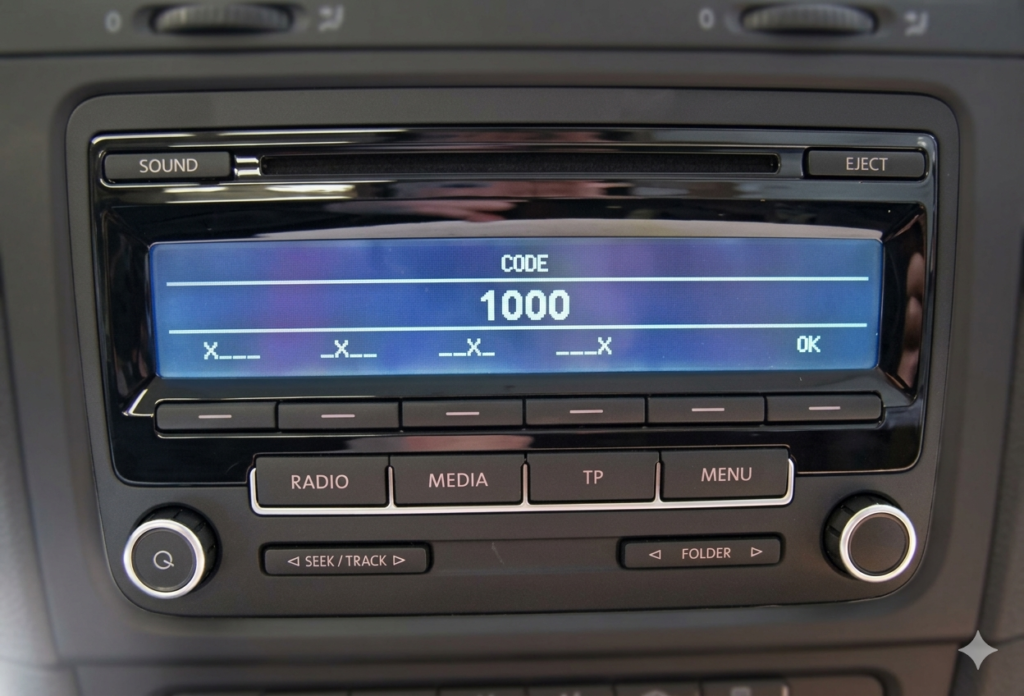
Did you recently change your car battery or have your vehicle serviced, and now your Volkswagen multimedia system (RNS 510, RNS 315, or RCD 510) is displaying the “ENTER CODE” o “SEGURO” message? Don’t panic! This is a standard security measure for VAG Group units (VW, Skoda, Seat), and unlocking it is much simpler than you think.
In this guide, we will show you how to recover your PIN code in just a few minutes using the specialized services at RadioCodeGenerator.com.
Step 1: Find the Radio’s Serial Number
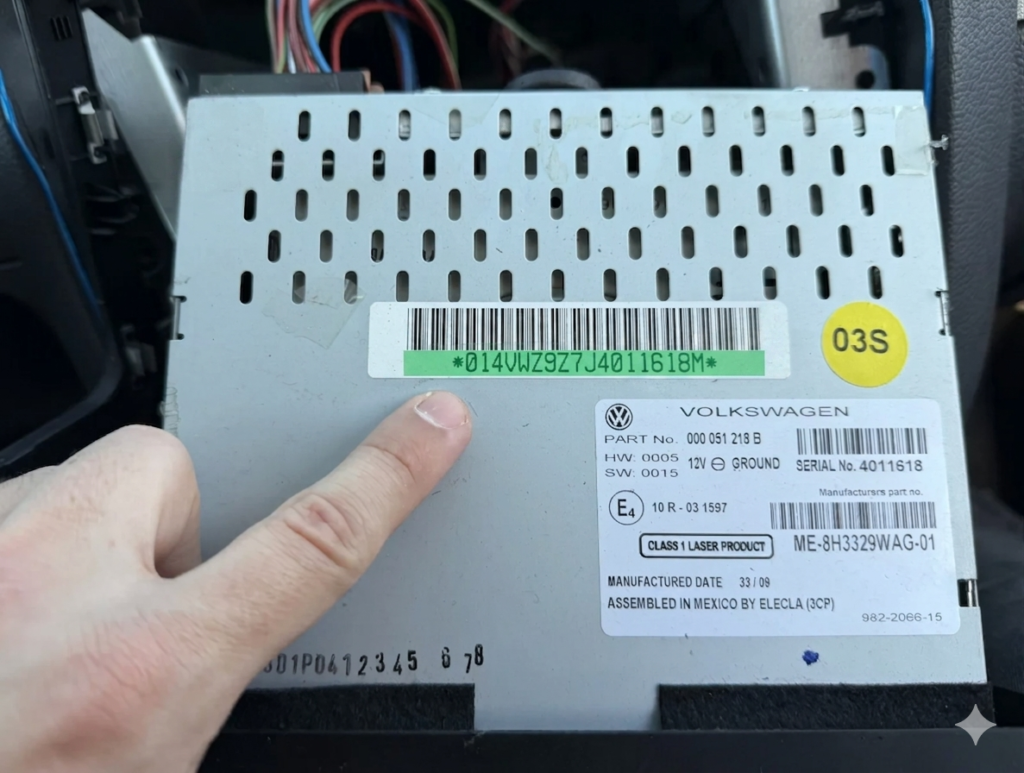
To generate the correct unlock code, we need your unit’s unique serial number. Unlike many Ford models, VW units almost always require you to partially remove the device to see the identification label.
METHOD A: Checking the Serial via the Screen (Available on some models)
- Turn on the radio.
- Press and hold the Setup button for about 10 seconds until a hidden menu (Service Mode) appears.
- Select Versions.
- Look for the “Serial Number” field. It always starts with the letters VWZ (e.g., VWZ1Z2K1234567).
METHOD B: Removing the Unit (The most reliable method)
If the menu is not accessible, you will need to remove the unit from the dashboard using a plastic prying tool (to remove the trim frame) and a Torx T20 screwdriver.
- The serial number is printed on a white label located on the metal casing.
- The number is also engraved directly into the metal on one of the side panels.
- Correct Format: 14 characters starting with VWZ (Example: VWZ6Z7L8204132).
Step 2: Generating the Unlock Code
Once you have the Serial Number (VWZ…), the recovery process is simple and automated:
- Access the Platform: Visit RadioCodeGenerator.com – VW Section.
- Enter Serial: Fill in the corresponding field with your 14-character serial number.
- Get your Code: The automated system will cross-reference the official database and generate your unique 4-digit PIN code.
Why use RadioCodeGenerator? Because it is a fast, secure, and much cheaper solution than visiting an official dealership, where the process can take days and involve high diagnostic fees.
Step 3: How to Enter the Code into RNS / RCD Units
The interface for these models is modern and touch-based, making the entry process very intuitive.
- Once the radio is on and the “Enter PIN” message appears, you will see a numeric keypad on the screen.
- Enter the 4 digits of the code you received (for example: 1284).
- After entering the last digit, the unit usually unlocks automatically. If it doesn’t, press the OK o Ingresar button on the display.
Important Note for RNS 510: If you have entered the correct code and the unit doesn’t start, ensure you confirm the entry by pressing the button marked with an arrow or “OK”.
Beware of Errors! (SAFE Mode)
Volkswagen systems are strict regarding incorrect attempts:
- SAFE / System Locked: If you enter the wrong code twice in a row, the unit will lock for 60 minutes.
- What to do? Leave the radio turned on (with the ignition on if necessary) for one hour without touching it. After 60 minutes, the code entry field will become active again.
Useful Tip: Always double-check the VWZ serial number before generating the code. A single typo will result in a code that won’t work for your specific unit.
Conclusion
Don’t let silence take over your drive. With the help of RadioCodeGenerator.com, unlocking an RNS 510, RNS 315, or RCD 510 is a task anyone can handle at home or in the parking lot.
Need help? Access the VW unlock section now and get your favorite music back!