
Generador de código PIN para radios Volkswagen Beta | Delta
Recover your original VW Beta & Delta code - enter your i número de serie below.
See How Easy It Is to Get Your Radio Code
Watch this quick video to see how simple it is to retrieve your unlock code — no technical skills required.
VW Beta & Delta Radio FAQ: Answers & Assistance
Have questions about unlocking your Volkswagen Beta or Delta radio? Visit our Contacta con nosotros page or check the frequently asked questions below.
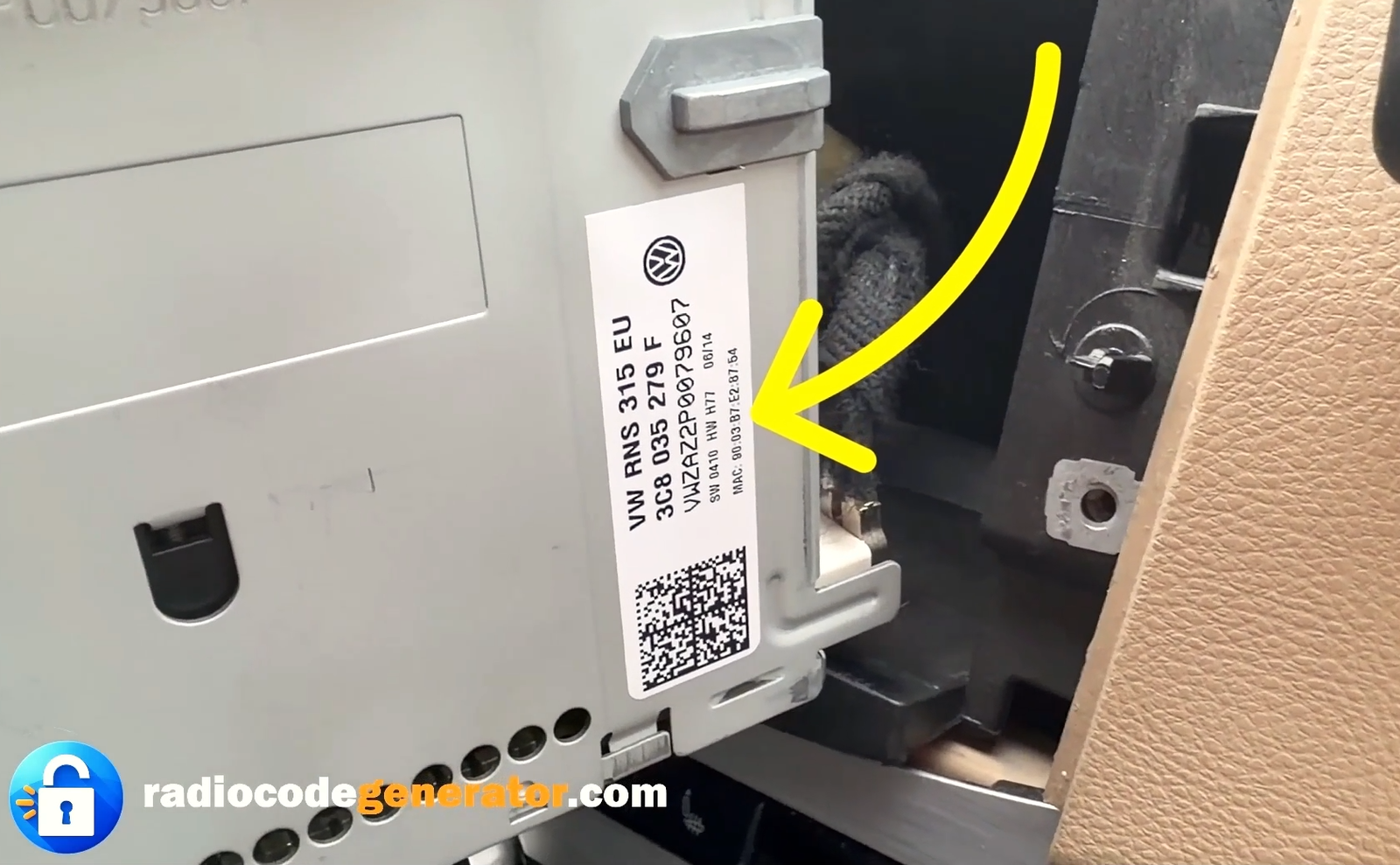
The serial number for classic Volkswagen Beta and Delta units is printed on the label sticker attached to the metal housing of the radio. You will need to slide the unit out of the dashboard to view the sticker.
Volkswagen Beta and Delta serial numbers usually start with letters such as "VWZ" followed by a unique combination of letters and digits (for example: VWZ2Z...). Make sure to enter the complete sequence accurately.
Our automated decoding system processes Beta and Delta units instantly. Your code will appear on your screen right after verification and will also be sent to your email within minutes.
Use preset buttons 1 through 4 repeatedly to input each digit of your 4-digit code, then press and hold the designated preset button (or TP/TA button depending on the model) to confirm and unlock the stereo.
No special cables or software tools are required. The process is 100 percent online, fast, and secure using only your unique radio serial number.
We provide a full money-back guarantee. If your code fails to unlock the stereo, contact our support team with a short video showing the serial label and code entry process for an immediate review and refund.
What Do SAFE, 1000, CODE and 2 SAFE Mean?
Seeing a message on your Volkswagen radio and not sure what to do next? These messages indicate different stages of the radio security system. Learn what each one means and how to proceed before entering your radio code.
SAFE – Radio Locked
The SAFE message means your Volkswagen radio is in security mode. This can happen after a battery disconnection, power loss or when the radio is installed in another vehicle.
1000 – Ready for Code Entry
On many Volkswagen radios with preset buttons, 1000 is the initial code entry screen. Each button press changes a digit, allowing you to enter your four-digit radio security code.
CODE – Enter Your PIN
Some newer Volkswagen radios display CODE instead of 1000. This is simply the code entry prompt. Depending on the radio model, you may use the touchscreen or physical buttons to enter your PIN.
2 SAFE – Temporary Lockout
The 2 SAFE message generally indicates that the radio has entered a temporary security lockout after incorrect code attempts.
Don't have your Volkswagen radio code?
Recover your radio security code quickly and get back to enjoying your music.
Note: Display messages and unlocking procedures may vary depending on your Volkswagen radio model and generation.
VW Beta & Delta Radio FAQ: Answers & Assistance
Have questions about unlocking your Volkswagen Beta or Delta radio? Visit our Contacta con nosotros page or check the comprehensive guide and steps below.
Finding The Serial Number For Volkswagen Beta & Delta Stereos
Para recuperar su código, necesitará el número de serie único grabado o impreso en la carcasa del sistema de navegación. Siga estos sencillos pasos:
- Retire parcialmente la unidad: Carefully insert standard release keys into the slots on the front panel corners to unlock internal clips, then slide the vintage radio slightly out of the dashboard.
- No wiring removal: No es necesario desconectar ningún cable.
- Localice la etiqueta: Check the top, side, or back metal casing of the unit to find the official Volkswagen white sticker label or stamped serial numbers.
- Identifique su número de serie: Busque el número de serie único que comienza con VWZ (e.g., VWZ1Z2K1234567 o VWZZ1Z2...).
Extraction Tutorial & Serial Examples
Here is a quick tutorial to help you extract your classic VW Beta or Delta unit safely without damaging older dashboard plastics. On some older Blaupunkt or Grundig variants, the serial number might be stamped directly into the metal housing alongside the barcode label.
Pay close attention when reading characters to avoid confusing lowercase letter 'l' with uppercase 'I' or number '1', as well as letter 'O' with number '0'.
Examples of common serial numbers:
VWZ1Z2H5678901(Blaupunkt variants)VWZZ1Z29876543(Grundig / Philips variants)
Cómo introducir el código de desbloqueo para VW Beta y Delta
- After turning on your classic audio system, make sure your screen displays 'SAFE' o le solicita que introduzca un código.
- Utilice el preset buttons (1 to 4) ubicado en el panel frontal de la radio para introducir su código de desbloqueo único de 4 dígitos.
- Presione el botón 1 repetidamente para seleccionar el primer dígito, button 2 for the second, button 3 para el tercero, y button 4 para el último dígito.
- Double-check the screen display to ensure numbers match your received unlock code before confirming.
- Once the full code is displayed, press and hold the Right Arrow / TP / TA botón (o el mando de sintonización/botón de confirmación de presintonía, según el modelo exacto) para guardarlo y desbloquear el sistema al instante.
¿Tiene preguntas o necesita ayuda?
If you face any issues entering your code, if your vintage unit remains locked after multiple incorrect attempts, or if you need further help with your serial number, don't worry—simply CONTACT US and we will sort it out for you promptly.
For additional tips, troubleshooting advice on wait times between incorrect code entries, and step-by-step guides on vintage Volkswagen car audio systems, feel free to explore our platform.