
How to Unlock Your Renault Radio After Battery Replacement or “CODE” Message
Renault vehicles are equipped with an advanced anti-theft security system for their audio units. When the battery is disconnected, replaced, or the power supply is interrupted, the radio will automatically request a security PIN code.
If your display shows “CODE”, “ENTER PIN”, “RADIO LOCKED”, or “WAIT”, this is not a malfunction. It is a built-in protection feature designed to prevent unauthorized use.
In this comprehensive guide, you will learn:
- How Renault radio security systems work
- How to identify your radio model
- How to locate the serial number
- How to enter the unlock code correctly
- What to do if the unit is locked
- Why professional online services are the fastest solution
Chapter 1: Why Does a Renault Radio Require a Code?
Renault implemented radio security systems to prevent theft.
The code system is designed to:
- Protect the radio unit from unauthorized use
- Link the radio to its internal serial number
- Ensure only the rightful owner can activate it
When power is disconnected, the system enters protection mode and requests a 4-digit PIN code.
This applies to many popular Renault models, including:
- Renault Clio
- Renault Megane
- Renault Scenic
- Renault Laguna
- Renault Captur
- Renault Twingo
- Renault Kangoo
- Renault Trafic
- Renault Master
Chapter 2: Types of Renault Radio Units
Over the years, Renault has used different manufacturers.
2.1 Blaupunkt Units
Common in older models such as Clio II, Megane I, and Laguna I.
Characteristics:
- 4-digit code
- Serial number printed on metal casing
- Label starting with BP
These units are straightforward to decode once the serial number is available.
2.2 Philips Units
Found in several early 2000s models.
Features:
- 4-digit PIN system
- Physical serial label
- Button-based code entry
2.3 VDO / Continental Systems
Used in mid-generation vehicles.
Features:
- Digital display
- Serial number required for code retrieval
- May require removal from dashboard
2.4 Media Nav & R-Link Systems
Modern Renault vehicles use advanced multimedia systems such as:
- Media Nav
- R-Link
- R-Link 2
These systems may require serial-based code recovery and are more advanced than traditional radio units.
Chapter 3: How to Find Your Renault Radio Serial Number
To retrieve the correct code, you need the radio’s serial number.
There are two main methods:
Method 1: Display Method (If Supported)
On some units, the serial number can be accessed using key combinations:
- Turn ignition ON
- Press and hold specific buttons (varies by model)
- In some cases, press and hold preset buttons during startup
If this does not work, you must remove the unit.
Method 2: Removing the Radio Unit
For most classic models:
- Use proper radio removal tools
- Insert them into the side slots
- Gently pull the unit out
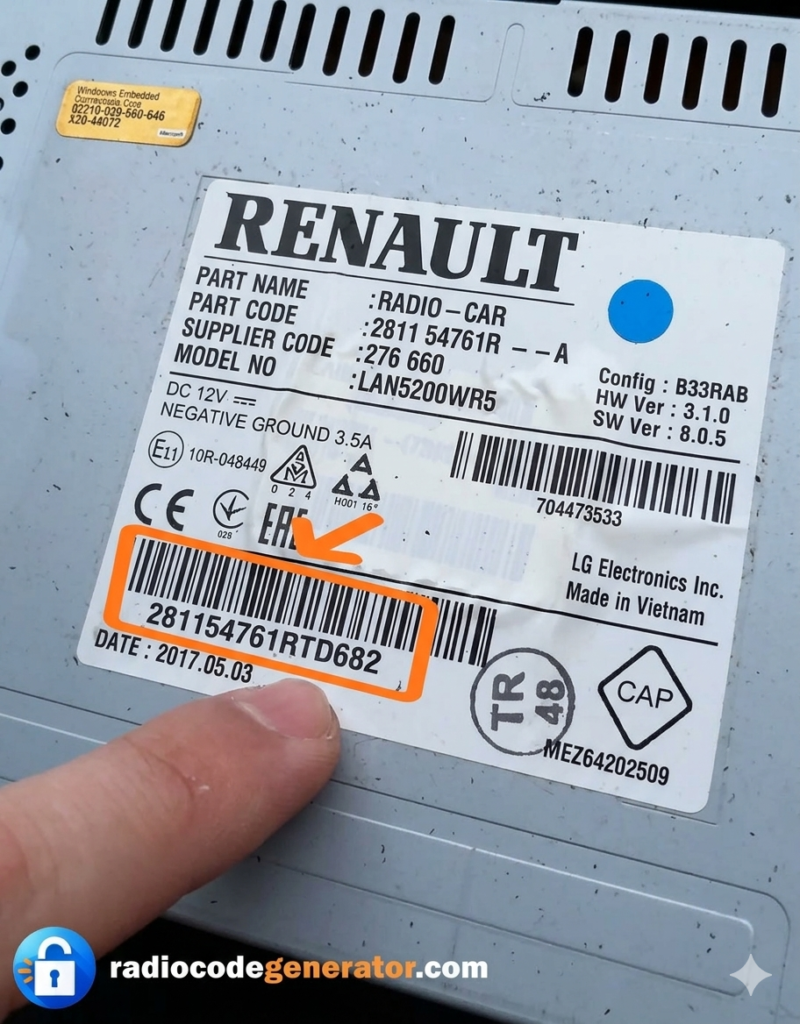
- Locate the label on the back
The sticker will contain:
- Serial number
- Model number
- Manufacturer code
Write down the serial number exactly as shown.
Chapter 4: How to Get Your Renault Radio Code Online
Once you have the serial number, you have two options.
Option 1: Dealership
Advantages:
- Official source
Disadvantages:
- Higher cost
- Possible waiting time
- Documentation required
Option 2: Professional Online Service
This is the fastest and most convenient solution.
You can retrieve your Renault radio code through our official platform:
Dedicated Renault service:
🔗 Renault Radio Code Generator
Benefits:
- 100% online process
- Fast delivery
- No dealership visit required
- Secure database access
- Works for most Renault serial numbers
Chapter 5: How to Enter the Code
The process depends on the radio type.
5.1 Classic Button-Based Units
- Turn the ignition ON
- Wait for “CODE” to appear
- Use buttons 1–4 to enter digits
- Button 1 → First digit
- Button 2 → Second digit
- Button 3 → Third digit
- Button 4 → Fourth digit
- Press and hold button 6 or “OK” to confirm
The radio should unlock immediately.
5.2 Units with Digital Interface
Use:
- Arrow keys
- Rotary selector
- On-screen keypad
After entering the correct PIN, confirm with “OK”.
Chapter 6: “WAIT” or “ERROR” Message
If incorrect codes are entered multiple times, the system will temporarily lock.
If you see “WAIT”:
- Turn ignition ON
- Leave the radio powered
- Wait 30–60 minutes
- Do not turn off the vehicle
- After the timer ends, try again with the correct code
This is a standard security delay.
Chapter 7: What If the Radio Is Completely Locked?
In rare cases, after too many incorrect attempts, the unit may require advanced reset procedures.
Possible solutions:
- Professional reprogramming
- Diagnostic tool reset
- Official code database retrieval
Avoid unauthorized software or risky modifications.
Chapter 8: Why Avoid Free Code Generators?
Searching for “free Renault radio code” can lead to problems.
Common Risks:
1. Incorrect Codes
Many free tools use outdated databases.
2. Malware Risks
Some sites require downloads that may contain harmful files.
3. No Support
If the code fails, there is usually no assistance.
4. Modern Units Cannot Be Generated Freely
Newer systems require secure database access.
For reliable results, use a professional service.
Chapter 9: Model-Specific Information
Renault Clio
Very common to request code after battery change.
Renault Megane
May require unit removal depending on generation.
Renault Scenic
Often equipped with integrated multimedia systems.
Renault Captur
Usually Media Nav system.
Renault Kangoo
Simple system, quick recovery with serial number.
Chapter 10: How to Prevent Future Lockouts
- Keep your radio code stored safely
- Avoid disconnecting the battery unnecessarily
- Use a battery maintainer for long-term parking
- Ensure proper battery condition
This will reduce the chance of system activation.
Frequently Asked Questions (FAQ)
Is the code linked to the car or the radio?
In most classic systems, the code is linked to the radio unit, not the VIN.
Can I move the radio to another Renault?
Yes, if you have the correct code. Some newer systems may require synchronization.
What if I lost the original code card?
You can retrieve the code using the serial number through a professional online service.
Is it safe to order a code online?
Yes — if you choose a trusted and secure provider with updated databases.
Conclusion
Renault radio security systems are designed to protect your vehicle’s audio equipment, but they can be easily unlocked with the correct information.
By identifying your serial number and using a reliable service, you can restore your radio quickly without expensive dealership visits.
For fast and professional Renault radio code retrieval, visit: