
Long-haul journeys behind the wheel of a Volvo truck—be it the legendary FH16, the versatile FM, or the North American VNL models—are defined by cabin comfort and audio quality. However, the nature of heavy-duty transport involves rigorous maintenance, battery swaps in extreme winter conditions, and the routine isolation of electrical circuits. All of these actions inevitably lead to a common hurdle: the audio unit locking into “Security Code” or “Enter PIN” mode.
This exhaustive guide is designed to be the definitive resource for any Volvo driver or fleet manager facing a bricked audio system, providing deep-dive technical insights and efficient recovery solutions through Radiocodegenerator.com.
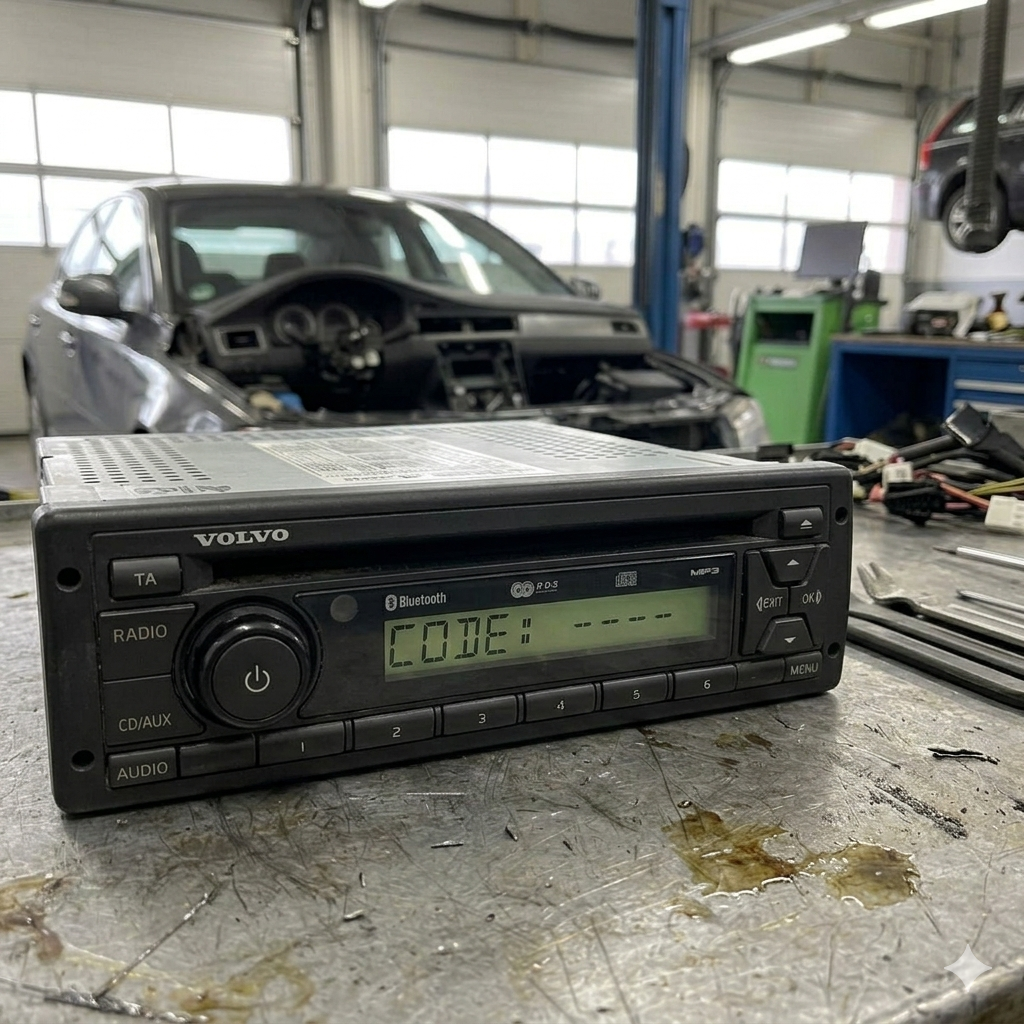
Introduction: Why Do Volvo Radios Lock?
Volvo Trucks’ electronic systems are recognized as some of the most sophisticated in the commercial vehicle industry. Unlike a standard passenger car, a Volvo truck functions as a complex digital ecosystem where the audio unit is not just a music player—it is a critical node on the J1939 CAN-bus network.
The Anti-Theft Architecture and “Keep-Alive” Memory
Volvo’s security protocol relies on monitoring “keep-alive” voltage. When the main battery isolator (kill switch) is turned off for extended periods, or when voltage drops below the critical threshold (typically 18V in a 24V system), the radio’s volatile memory is wiped.
The system automatically assumes the unit has been illegally removed and enters a “lockdown” state. This measure, while frustrating for the owner, is designed to deter the theft of high-value electronic components from truck cabins. Without a unique 4-digit PIN, the unit remains a “brick,” silencing your speakers, Bluetooth hands-free systems, and integrated navigation.
Chapter 1: Identifying Audio Units in Volvo Models
Volvo does not manufacture its own radios; they partner with global electronics giants to create units capable of withstanding constant vibration and the harsh environment of long-haul trucking. Identifying the manufacturer is the first step toward recovery.
1.1. The VR Series (Manufactured by Delphi / Grundig)
These units are the backbone of the Volvo FH12, FH (Gen 2), and older FM models. They are standard 1DIN units and are incredibly rugged.
- Distinctive Signs: Monochrome LCD (green or amber), large rubberized buttons, and often a CD or cassette slot.
- Security: They use a straightforward but strict numeric code system. Entering the wrong code three times leads to long lockout periods.
1.2. The Bosch / DEA Series (High-End Displays)
Found in modern Volvo FH (Version 4) and FM trucks. These are often integrated into the secondary dashboard display.
- Complexity: Bosch utilizes advanced encryption algorithms. While these radios are often “soft-locked” to the Vehicle Identification Number (VIN), they will still demand a physical code if moved or if the battery remains dead for too long.
- Features: These support Bluetooth streaming, USB inputs, and steering wheel controls.
1.3. Continental / VDO Units
Used predominantly in regional delivery models like the Volvo FE and FL series.
- Characteristics: Minimalist design focused on clear radio reception and durability. Their codes are generated based on a specific Continental database that correlates the serial number with a proprietary manufacturing algorithm.
Chapter 2: Locating the Serial Number (The Key to Freedom)
To generate a code via Radiocodegenerator.com, you need one specific piece of data: the Serial Number. This is not the truck’s VIN or the Part Number.
2.1. The Physical Extraction Method
In 90% of cases, you must remove the radio to read the label on the metal chassis.
- Tools Needed: You require “U” shaped extraction keys (DIN keys). In an emergency, thin nails or stiff wire can be used, though this risks damaging the retention clips.
- Procedure: Insert the keys into the four small holes at the corners of the faceplate. Push until you feel a “click,” then pull slightly outward while sliding the radio toward you.
2.2. Identifying the Correct String
Once the unit is out, look for a barcode. The serial number usually begins with:
- VO… (e.g.,
VO1234X1234567) – The classic Volvo format. - BP… – Specific to Blaupunkt units.
- GM… – Common on Delphi-made units.
- 76… – A long string of digits specific to Bosch hardware.
2.3. The Button Shortcut (Newer FH Models)
Some Bosch units allow you to view the serial number on the screen without removal:
- Turn the radio ON.
- Simultaneously press and hold buttons 1 and 6 (or 2 and 5) for 5 seconds.
- The screen will cycle through software versions and the Serial Number (SN). Note this down carefully.
Chapter 3: Step-by-Step Code Entry Guide
Once you have retrieved your code, it must be entered with precision. Each model has a different “input language.”
3.1. Entry via Preset Buttons (1-4)
If your radio only has buttons 1 through 6, you use the repetitive press method. Suppose your code is 5291:
- Press button 1 five times (until 5 appears).
- Press button 2 twice (until 2 appears).
- Press button 3 nine times (until 9 appears).
- Press button 4 once (until 1 appears).
- Confirmation: Press the Power/Volume knob, the “Enter” key, or the Seek Up (>) button for 3 seconds.
3.2. Direct Keypad Entry
On units featuring a full 0-9 keypad, simply type the digits in sequence. The unit should unlock automatically the moment the final digit is entered correctly.
Chapter 4: Troubleshooting: “Wait,” “Lock,” and “Error”
Volvo systems are programmed to penalize successive wrong attempts to prevent “brute force” attacks (guessing the code).
4.1. The Penalty Levels
- Wait 1 / Wait 2: Indicates 2 or 3 failed attempts. You must wait a short interval (10-20 minutes).
- The 60-Minute Rule: This is the most common penalty. The radio must be left turned on for exactly 60 uninterrupted minutes.
- Warning: Do not turn off the ignition. Do not start the engine during this time (the voltage dip during cranking may reset the timer). This is best done during a mandatory 45-minute tachograph break or during loading.
4.2. “OFF” or “LOCKED” Message
If this appears, the maximum number of attempts (usually 10) has been reached. In this case, you may need to leave the unit powered for 24 hours, or in extreme cases, the unit must be sent to an electronics lab to have the EEPROM chip manually reset.
Chapter 5: Comparison: Dealership vs. Online Generator
In the trucking industry, Time is Money. Let’s analyze why professional drivers prefer online solutions.
| Feature | Volvo Dealership | Radiocodegenerator.com |
| Cost | $60 – $180 (Labor + Code) | $10 – $25 |
| Wait Time | 1-3 Business Days | 15 – 60 Minutes |
| Logistics | Must drive truck to the shop | Done from the cab via smartphone |
| Requirements | VIN + Proof of Ownership | Radio Serial Number Only |
| Availability | Monday-Friday (Business Hours) | 24/7 / 365 |
Real-World Scenario: You are on an international haul, you swapped batteries in Germany on a Saturday night, and your radio is bricked. The dealership is closed until Monday. With Radiocodegenerator.com/Volvo, you can have your music back before you finish your coffee.
Chapter 6: Diagnostic Tips for the Truck’s Electrical System
If your radio asks for a code frequently even without a battery swap, you have an underlying electrical issue.
6.1. Checking the Fuses
Volvo radios have two power lines:
- Constant Power (B+): Maintains the code memory.
- Switched Power (ACC): Turns the radio on with the ignition.If the “Constant Power” fuse is blown or has a poor connection, the radio will reset every time you turn the truck off. Check the fuse panel (usually located in the center dash or behind the passenger seat).
6.2. CAN-bus Wiring Issues
If the unit displays “CAN CHECK” or “NO CAN,” it has lost communication with the truck’s brain. This is often caused by corrosion on the plugs behind the radio, a common issue if liquids were ever spilled on the dashboard.
Chapter 7: FAQ for Volvo Truckers
Q: Can I get the code using my Truck’s VIN?
A: Sometimes, but it is unreliable. If the radio was ever replaced under warranty or by a previous owner, the VIN will point to the old radio code, not the one currently in your dash. The radio serial (VO…) is the only 100% accurate method.
Q: Will the code work for a used radio from a salvage yard?
A: Yes. The code is hardcoded into the radio hardware. As long as the serial label is intact, the generator can calculate the PIN.
Chapter 8: Maintenance Tips to Avoid Future Lockouts
- Write It Down: Once you recover the code, write it on a piece of tape and stick it inside the fuse box cover or the glovebox.
- Use a “Memory Saver”: When changing batteries, use a 9V memory saver plugged into the 12V/24V socket to maintain just enough voltage to keep the settings alive.
- Winter Battery Checks: A sudden voltage drop during a cold start at -15°C can reset the radio. Keeping batteries in top shape protects sensitive electronics.
Conclusion: Get Back to the Music
Driving a Volvo truck is a point of pride, and the cabin is your second home. Don’t let a minor technicality like a lost radio code ruin your journey. Identifying your VO/Delphi/Bosch serial number and using a fast tool like the Volvo Radio Code Generator is the smartest shortcut to a solution.
Whether you are on the motorways of Europe or crossing the Rockies in the US, the solution is now just a click away. Retrieve your code, enter it carefully, and enjoy the premium sound your truck deserves.
Safe travels, and “Keep the shiny side up!”