
Introduction: The “Safe Mode” Dilemma
It happens to the best of us. You change your car battery, perform a routine maintenance task, or perhaps a fuse blows. When you turn your ignition back on, instead of your favorite music, you are greeted with a cold, digital message on your dashboard: “SAFE” or “ENTER CODE”.
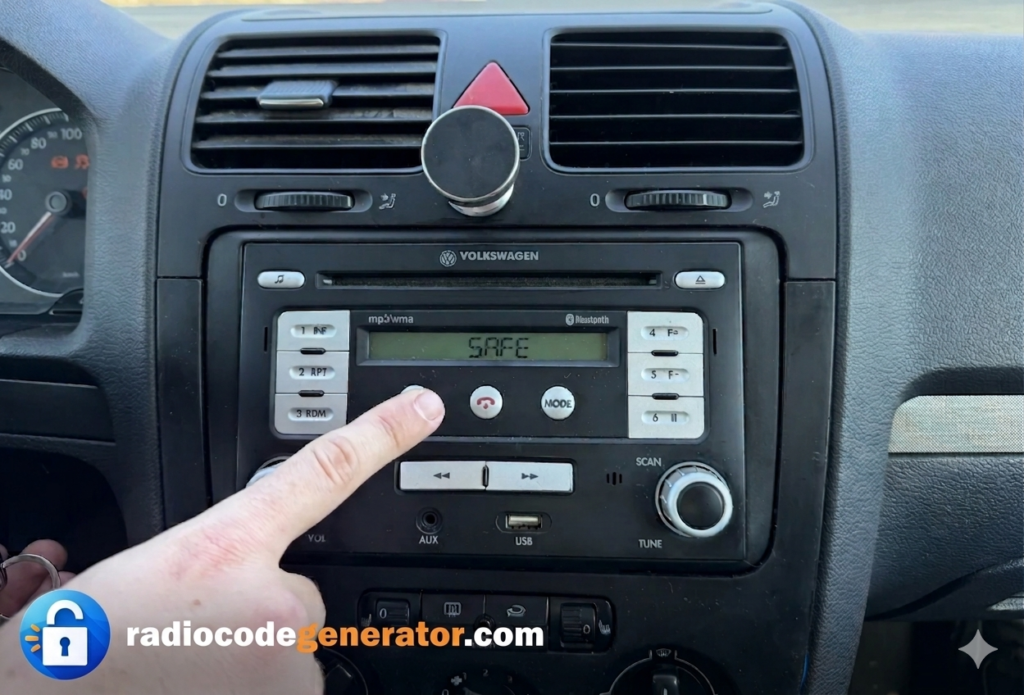
This is the Volkswagen anti-theft protection system in action. While it’s an excellent security feature, it becomes a major headache for the rightful owner who has lost the original manual or the small cardboard “Radio Card” that came with the vehicle. In this comprehensive guide, we will explore every possible method to retrieve your code—from the sometimes free dealership options to using the fastest professional online services like Radiocodegenerator.com—and specifically how to use a VW radio code generator to get your music back on the road in minutes.
Section 1: Understanding the VW Radio Security System
Volkswagen utilizes a sophisticated security architecture. Each audio unit is electronically “married” to the VIN (Vehicle Identification Number) of the car it was originally installed in.
Why does the radio lock?
The system checks for a digital “handshake” every time the power is cycled. If the radio detects a break in the constant 12V power supply, it assumes it might have been removed by an unauthorized person and locks itself instantly. This “Power Loss Lockout” feature has been a standard across the VW lineup since the early 1990s.
The Evolution of VW Audio Units
Over the decades, VW has partnered with various manufacturers for their infotainment systems. Knowing your unit’s manufacturer can often help in troubleshooting:
- Blaupunkt: The powerhouses of the ’90s and early 2000s. Highly common in older Golf MK3 and MK4 models.
- Delphi & Bosch: The primary manufacturers for the touchscreen era, specifically found in the widespread RCD 510 and RNS 510 units.
- Technisat: Frequently seen in newer MIB infotainment systems.
- Sony & Panasonic: Used in specific regional markets, particularly for non-European export models.
Section 2: Quick Guide by Vehicle Model
The Volkswagen Golf (MK1 to MK8)
The Golf is the absolute heart of the VW lineup.
- MK3/MK4: These usually feature the “Alpha”, “Beta”, or “Gamma” cassette and CD players. Their serial numbers are almost always stamped directly into the metal chassis on the side of the unit.
- MK5/MK6: This era introduced the RCD 300, 310, and 510. These units are secured by four T20 Torx screws hidden behind the plastic trim surrounding the dashboard.
- MK7/MK8: Newer models use MIB1, MIB2, and MIB3 systems. These are often split units, meaning the “brain” is hidden in the glovebox while the dashboard only houses the screen display.
The Volkswagen Passat (B5 to B8)
As a premium sedan, the Passat often featured high-end sound systems like the “Monsoon” setup or advanced Navigation Plus units.
- B5/B5.5: Often uses a double-DIN unit that requires four radio removal keys inserted simultaneously.
- B6/B7: Shares much of its core infotainment architecture with the Golf MK6.
- B8: Features the modern Composition Media and Discover Pro systems.
The Volkswagen Tiguan & Touareg
These SUVs typically come with factory navigation systems (RNS 510 or RNS 850). The Touareg RNS 850 is a unique system where the radio’s serial number might start with a different prefix, but modern online manual retrieval processes handle these luxury configurations with ease.
The Volkswagen Polo, Amarok & Beetle
From the compact Polo to the rugged Amarok and the iconic Beetle, the radio units are highly interchangeable across the VW Group. This means an RCD 510 in a Polo is treated exactly the same way as one inside a Transporter van.
Section 3: How to Find Your VW Radio Serial Number
Before you can use any online generator, you must identify your unit’s unique “DNA”.
Method A: The Screen Method (Modern Units)
On some newer RNS systems, you can hold down the “Setup” button for about 10 seconds. This can trigger a service mode where the serial number is displayed digitally. If this doesn’t work, try holding the “Mute” and “Setup” buttons down together.
Method B: Physical Inspection (The Chassis Sticker)
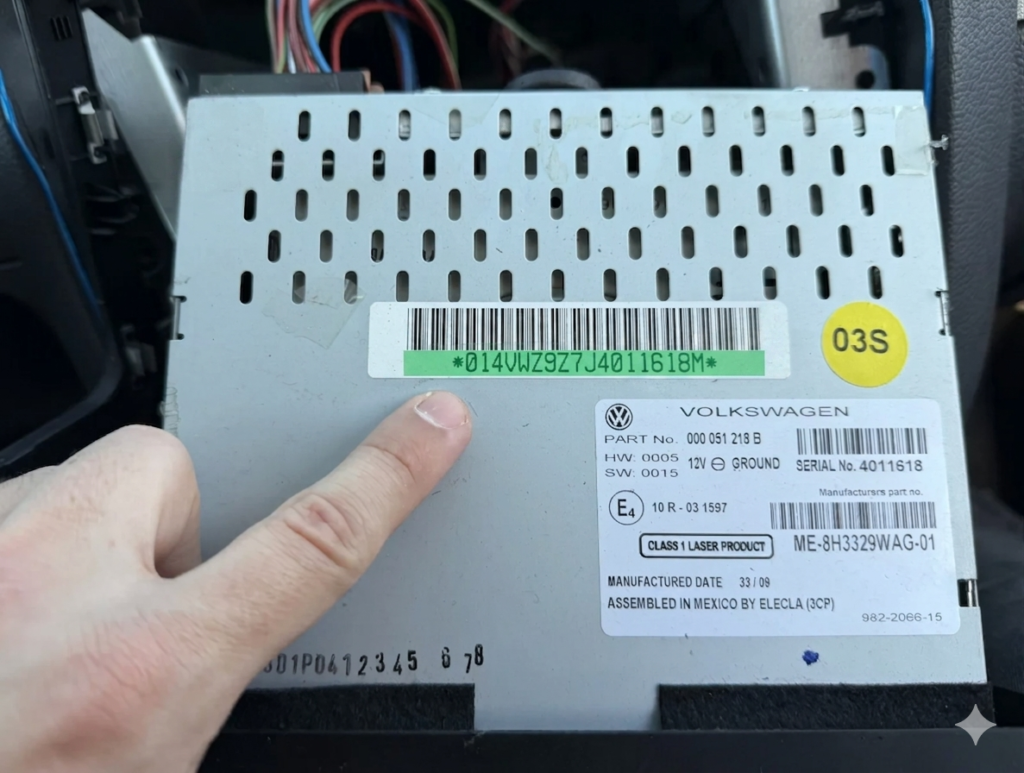
If the screen is completely locked and won’t display any info, you must partially extract the radio from the dashboard.
- Tools needed: A set of specialized VW Radio Removal Keys.
- Insertion: Insert the keys into the small slots located in the corners of the unit.
- Extraction: Gently pull the radio toward you.
- Identification: Look for a printed label or a stamped code starting with VWZ (e.g., VWZ1Z7…).
💡 DIY Hack: Making Removal Tools from an Old Credit Card
If you don’t have professional keys on hand, you can easily DIY them:
- Take an old plastic credit card or loyalty card.
- Cut four thin strips (about 5mm wide).
- Cut the tip of each strip at a 45-degree angle.
- Slide them into the radio slots to release the internal clips. Note: This requires patience and may not work on all heavy double-DIN units.
Section 4: Professional Online Retrieval vs. Dealerships
Many drivers’ first instinct is to call the local dealership. However, the official route is often slow and overpriced.
| Feature | VW Dealership | Radiocodegenerator.com |
| Cost | €50 – €150 | €8.99 – €40 |
| Waiting Time | 1-3 Days | 30 Mins – 2 Hours |
| Location | Must visit in person | 100% Online from home |
| Requirements | ID, Logbook, Proof of Ownership | Radio Serial Number Only (VWZ…) |
Section 5: Step-by-Step Guide to Entering Your Code
Once you have retrieved your 4-digit PIN, follow these steps carefully to avoid a permanent lockout.
For RCD 310 / RCD 510 Models:
- Turn on the radio.
- Use the preset buttons or the touchscreen digits to type in the code.
- Press “OK” or the “Right” arrow to confirm.
For Older Units (Gamma/Beta):
- Hold down the “TA” and “TP” buttons simultaneously until “1000” appears on the display.
- Use preset buttons 1–4 to cycle through the numbers (press button 1 repeatedly for the first digit, button 2 for the second, etc.).
- Hold down “TA” and “TP” together again to validate and unlock.
What is “SAFE 2” Mode?
This is a security lockout timer. If you see a small number “2” next to the word SAFE, it means incorrect codes have been entered repeatedly. You must leave the car ignition turned on and the radio powered ON for 60 minutes. You don’t have to drive the car, but the power supply must remain constant for the timer to countdown and reset, allowing you another attempt.
Section 6: Troubleshooting & Deep-Dive FAQ
- Q: My serial number starts with “SKZ” or “SEZ”?
- A: These are Skoda or SEAT units. While they look physically identical to VW radios, they belong to different manufacturer databases. Fortunately, modern decoding platforms support these networks as well!
- Q: Why do some codes cost more (e.g., €40)?
- A: Newer Audi and SEAT units, alongside high-end VW systems, utilize a security protocol known as Component Protection. Retrieving these requires a manual query into the manufacturer’s live secure servers, which involves higher database access fees.
- Q: Can I get the code using just my car’s VIN?
- A: No. If the radio was ever replaced during the vehicle’s lifespan, the car’s VIN will no longer match the radio unit. Specialized services rely strictly on the serial number printed on the radio itself to guarantee 100% accuracy.
- Q: What if the previous owner changed the internal chip?
- A: This is rare but does happen in the second-hand market. If a genuine factory code fails to work, it means the radio’s internal software has been physically tampered with (decoded in the past). In these specific scenarios, reputable services provide a full refund.
Section 7: The Technical Side of Radio Decoding
Decoding isn’t about guessing random numbers. It comes down to accessing the unit’s EEPROM (Electrically Erasable Programmable Read-Only Memory). Inside your VW radio, a tiny microchip stores the security PIN. When you request a code online, the platform accesses a global cross-reference registry that matches your unique Serial Number (VWZ…) with the exact factory PIN flashed onto that chip during manufacturing.
Conclusion
A locked radio shouldn’t mean permanent silence in your cabin. Whether you drive a vintage MK1 Golf or a modern Tiguan, unlocking it is a completely solved problem. By locating your VWZ serial number and opting for a specialized online service over a costly dealership visit, you save time, money, and unnecessary frustration.
If you have other brands in your garage, such as Audi, Fiat, or Chrysler, remember that modern digital platforms serve as a universal, one-stop shop for automotive audio solutions. Drive safe, and keep the music playing!